
Mobile internet abroad in minutes — no physical SIM card needed
Mobile internet abroad without roaming
eSIM online — internet right after arrival.
Choose your travel destination
How it works?
Choose a plan
Country, data volume and validity period
Pay for order
By card — fast and secure
Get your eSIM
QR code on screen and email confirmation
Install on phone
Scan QR or tap the install link
Activate on arrival
Turn on eSIM in destination country to get data
Choose a plan
Country, data volume and validity period
Pay for order
By card — fast and secure
Get your eSIM
QR code on screen and email confirmation
Install on phone
Scan QR or tap the install link
Activate on arrival
Turn on eSIM in destination country to get data
Comparison with alternatives
| Roaming | Local SIM | simfortrip | |
|---|---|---|---|
| Price per day | ~$6 | ~$1 | ~$1 |
| Connection | Automatic | Find a store | Instant |
| Document required | Not required | Passport | Not required |
| Works when | Immediately | After 1-2 hours | Immediately |
✓ 6x cheaper than carrier roaming
Device Compatibility
Does your phone support eSIM?
Dial *#06#: if EID appears, your device supports eSIM.
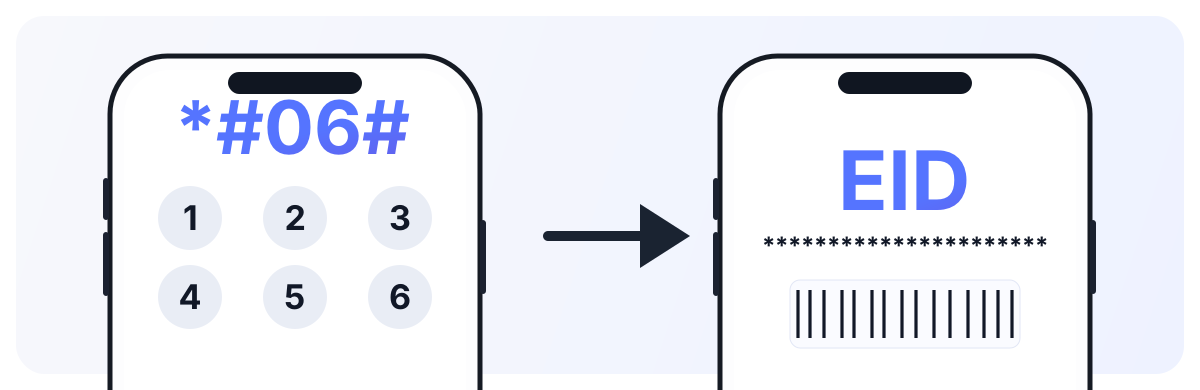
For iPhone, also verify there are no SIM restrictions: Settings → General → About → Carrier Lock (it should say “No SIM restrictions”).
Installation Guide
Select your platform and installation method
Open Settings → Cellular → Add eSIM
Select 'Use QR Code' and scan the QR from email
Confirm adding the cellular plan
Choose a label for eSIM (e.g., 'Travel')
On arrival: enable eSIM in cellular settings and turn on data roaming for it
Tip: Install eSIM at home over Wi-Fi. On arrival in another country, just enable it in settings and don't forget to turn on data roaming for it.
Guarantees
Money back
If eSIM doesn't work — we refund
Secure payment
Secure payments with data protection
24/7 Support
We respond via online chat and email
Money back
If eSIM doesn't work — we refund
Secure payment
Secure payments with data protection
24/7 Support
We respond via online chat and email